
Introduction
A major multinational telecom provider started a strategic shift toward mobile-first communication by moving away from traditional desk phones. In response to the growing needs of modern businesses and users, they partnered with our leading technology firm to build a robust mobile communication solution that supports advanced voice services and cloud-based infrastructure.
As the design lead for this initiative, I was responsible for overseeing the complete UX and UI design process and guiding the design team to deliver an intuitive, user-friendly experience. We built the solution to support flexible, enterprise-grade calling environments, tailored to fit diverse usage scenarios and communication needs across organizations.
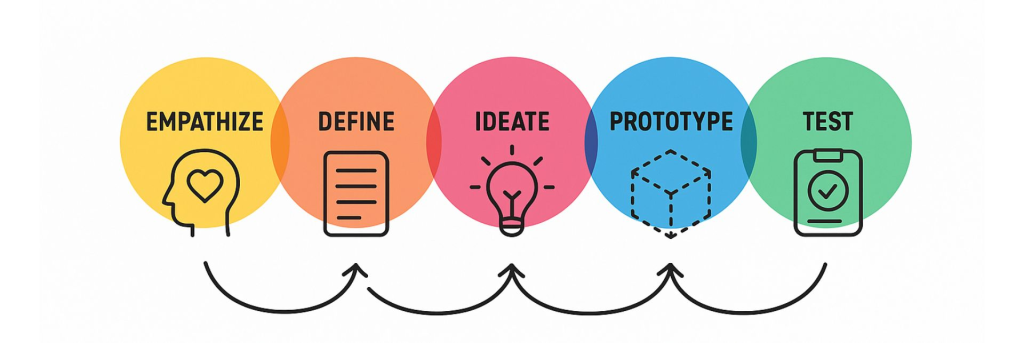
To meet the urgency of launching the application quickly while maintaining quality, the team structured the development into five strategic phases. This phased approach enabled early releases, allowed continuous feedback, and ensured that the solution grown in alignment with both technical goals and user expectations.
About Company
JMC – Japanese Multinational Company is a global telecommunications and technology leader headquartered in Japan. The company has built a diverse portfolio spanning broadband, mobile communications, e-commerce, finance, media, semiconductors, and emerging technology services.
Project Overview
As businesses moved toward mobile-first communication, JMC set out to reduce reliance on desk phones by creating a mobile app. I was chosen as the design lead for this project, responsible for the overall user experience and guiding a team of three UI designers.
The result was JMC ConnecTalk, a service that brings together mobile and cloud calling to adapt to different customer needs. Since the launch was a top priority, we followed a phased approach, breaking the project into five stages to deliver quickly while ensuring the app grew into a complete solution over time.
Problem Statement
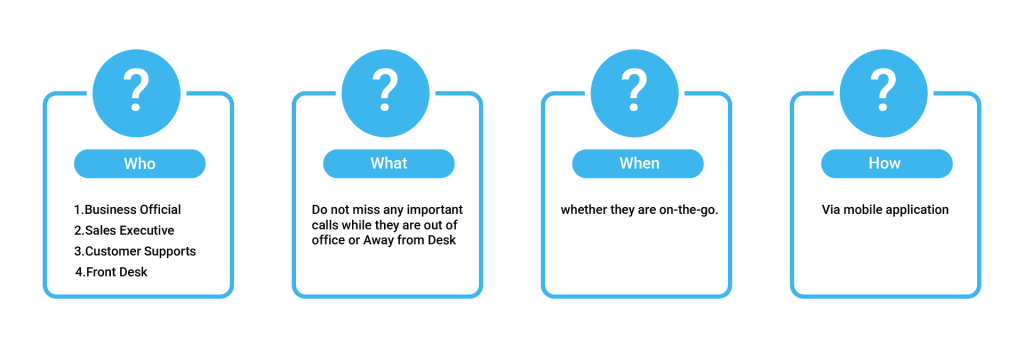
“Desk phone users often miss important calls when they are away from their desks or in meetings. These missed calls can lead to delays, rescheduling, or even costly setbacks in business activities.”
They really need a solution to ensure they never miss calls either by reaching them directly on the go or by having the right team member answer. This ensures timely business communication and addresses critical needs without delay.
Business Goals
A well-designed mobile app should be simple, intuitive, and a true replacement for a desk phone. The goal is to create an app that removes the frustrations of traditional phones while making communication easier, faster, and more efficient.
Design Process
User Research
The first question we asked ourselves was why the product owner wanted to replace desk phones with a mobile app. To gain clarity, we interviewed the product owner to understand the motivation behind the app, the challenges with desk phones, and the impact on their business.
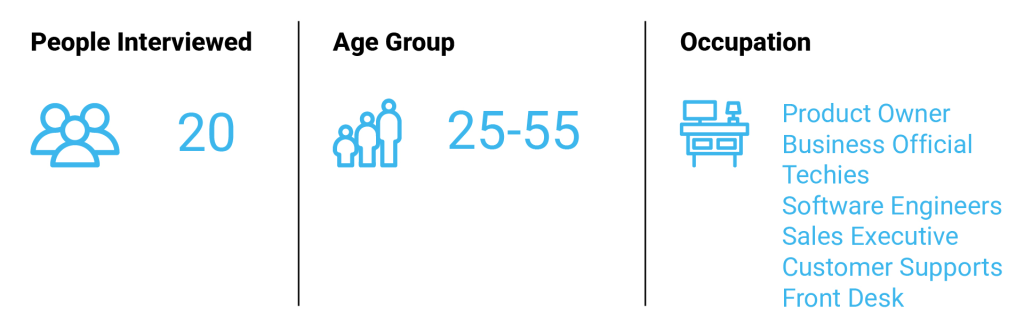
Next, we prepared a set of research questions and conducted user interviews to build empathy and uncover actual needs. We spoke with a diverse group of users including business officials, sales executives, support staff, software engineers, and technical teams to capture different perspectives and pain points.
User Statements
After interviewing 20 people from different occupations, we identified several common challenges, most of them centered on business communication. Key problem statements included:
- “We often miss important calls when away from the desk.”
- “There is no reliable alternative to the desk phone.”
- “As our customer base grows, the number of unattended calls keeps increasing.”
- “Having the ability to take desk phone calls on mobile would be very helpful.”
- “A solution that lets us handle calls while traveling or commuting would make things easier.”
Core Needs
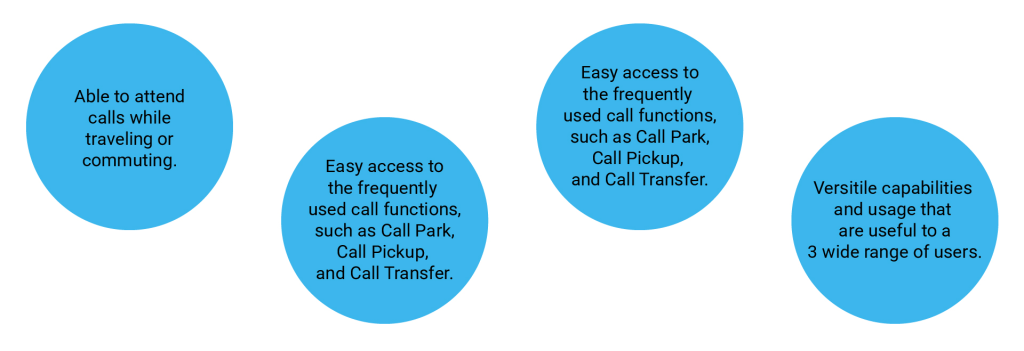
After analyzing the interviews and data, we identified several core user needs that must be addressed. Key needs include:
User Persona
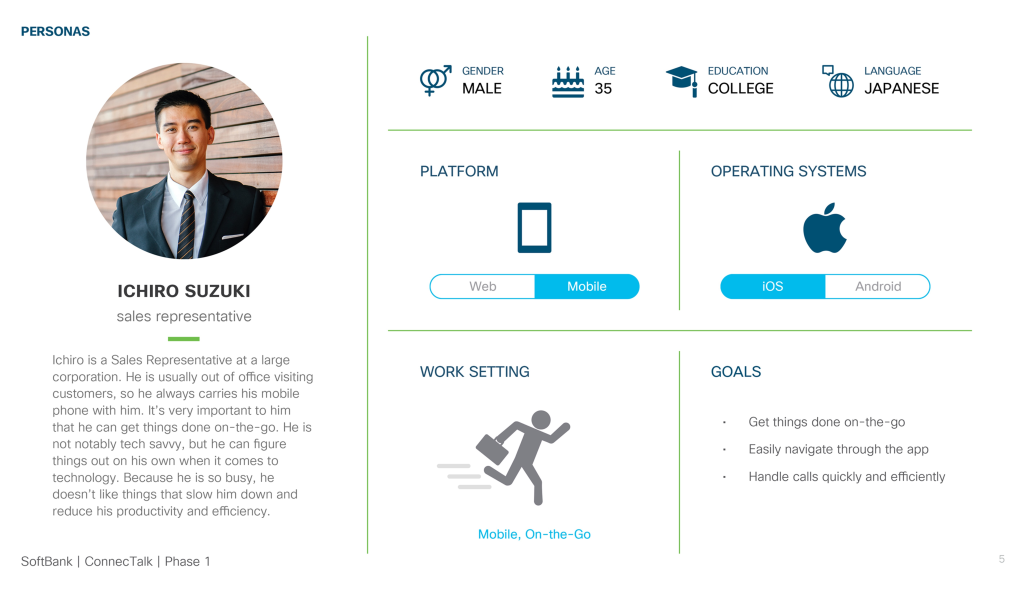
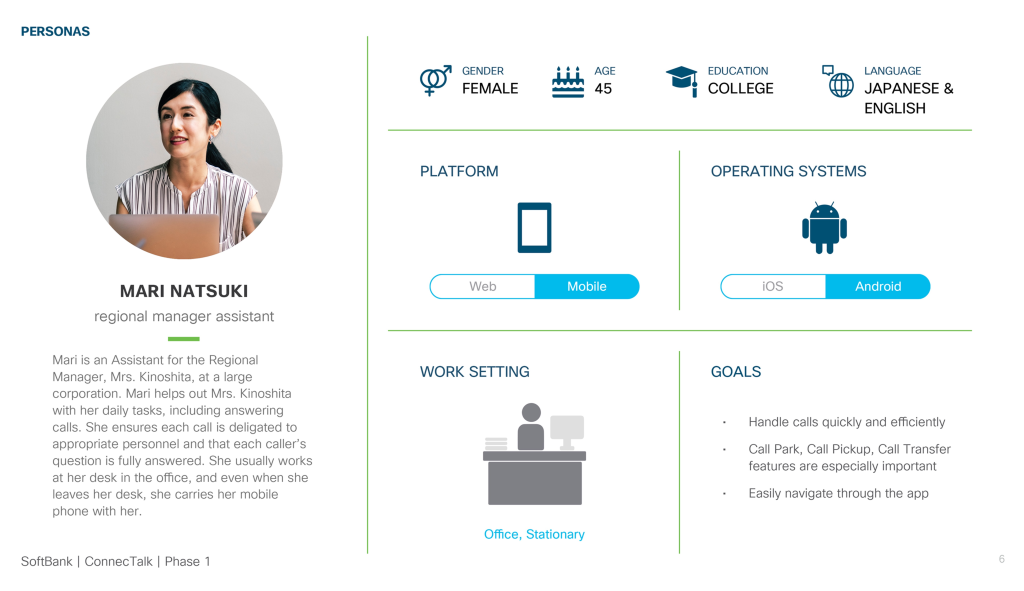
Since the company serves a wide variety of clients and employees, the personas needed to be broad and adaptable. For this project, we focused on two key personas: a Sales Representative and a Regional Manager Assistant.
Sales Representative
Regional Manager Assistant
User Journey Map
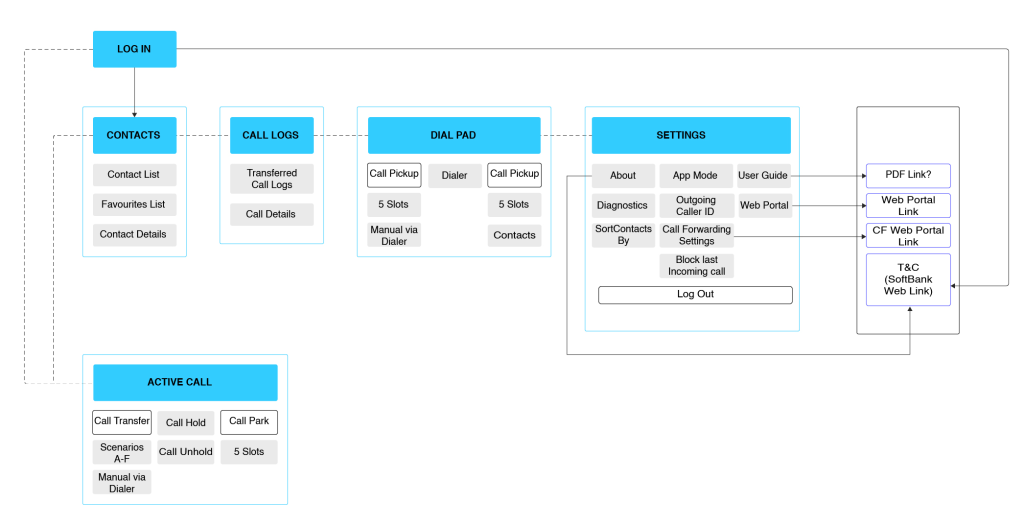
To illustrate the different user modes, we mapped out the journeys for the application. The journey map highlights the complete information architecture and shows how users move through the app. The application supports two distinct modes Office Worker Mode and Remote Worker Mode each designed to match the specific needs and workflows of its users.
Office Worker Mode
Remote Worker Mode
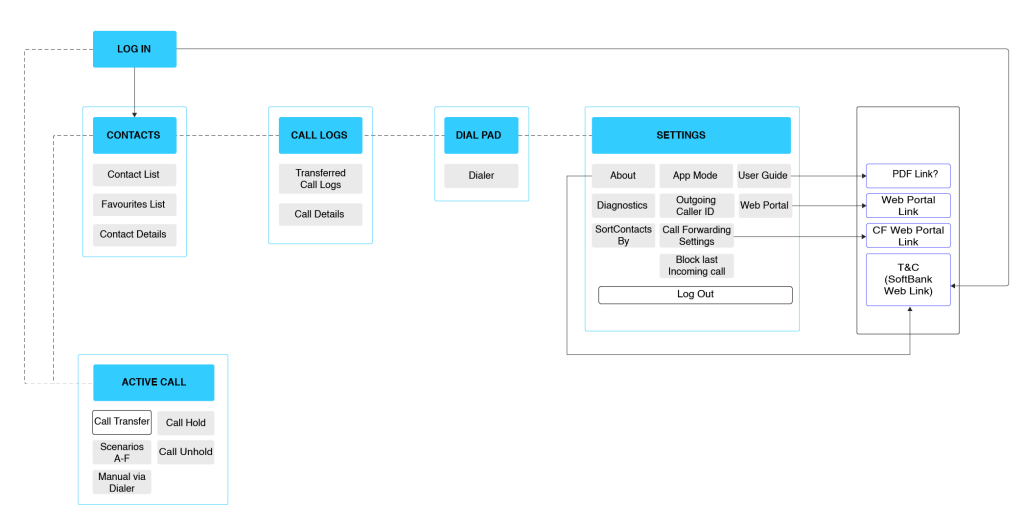
Low Fidelity Wireframe
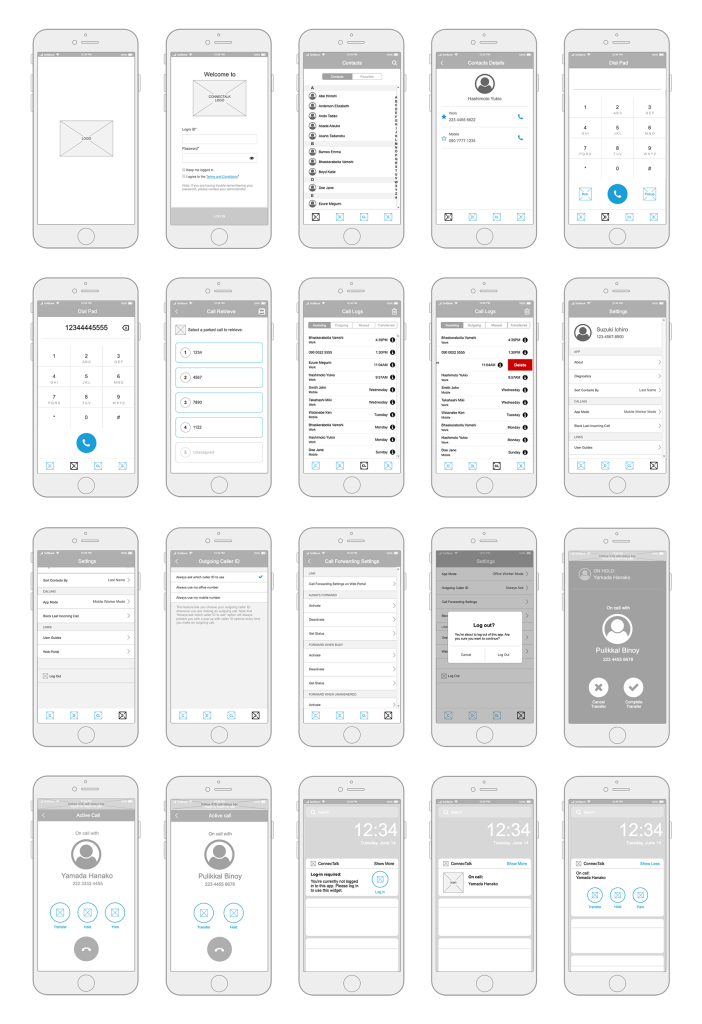
User Testing With Low Fidelity Wireframe
After testing the low-fidelity prototype, we gathered valuable insights into the app’s intuitiveness, navigation, and versatility for a wide range of users. Based on feedback, we implemented several key changes:
- Contacts: Updated the Favorites tab interaction from “tap to contact details” → “tap to call.”
- Navigation: Removed the hamburger menu and merged options into a single Settings tab.
- Widgets: We changed the design of widgets so that buttons are visible only when the widget is expanded.
- Search: Added filter options in the search results using top tabs.
- Call Logs: Introduced tabs to filter calls by incoming, outgoing, missed, and transferred.
iOS UI Design Screens
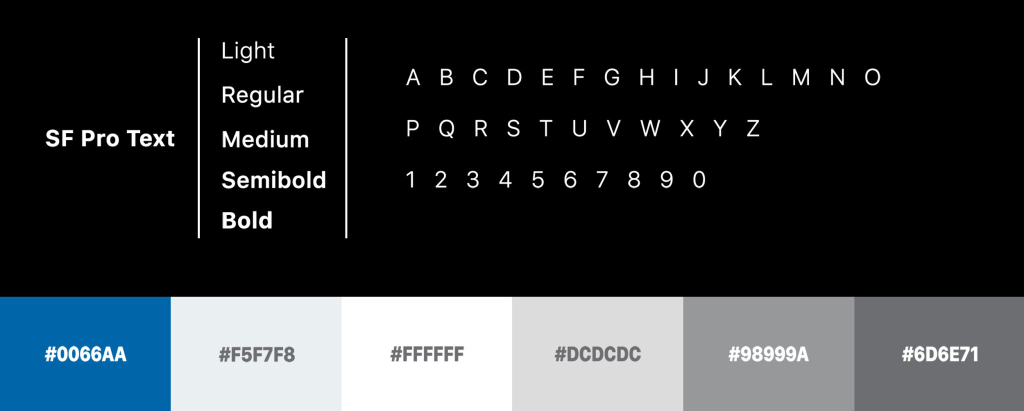
Typography and Color
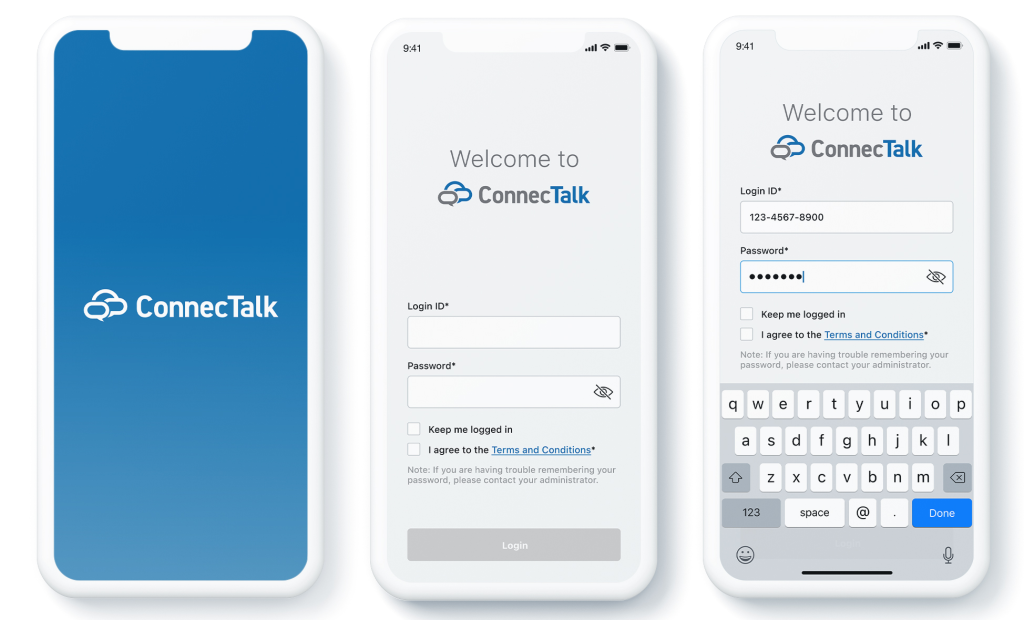
Splash and Login Screen
Below are the designs we created for JMC ConnecTalk. In this, we are displaying Splash, log in and log in with the password.
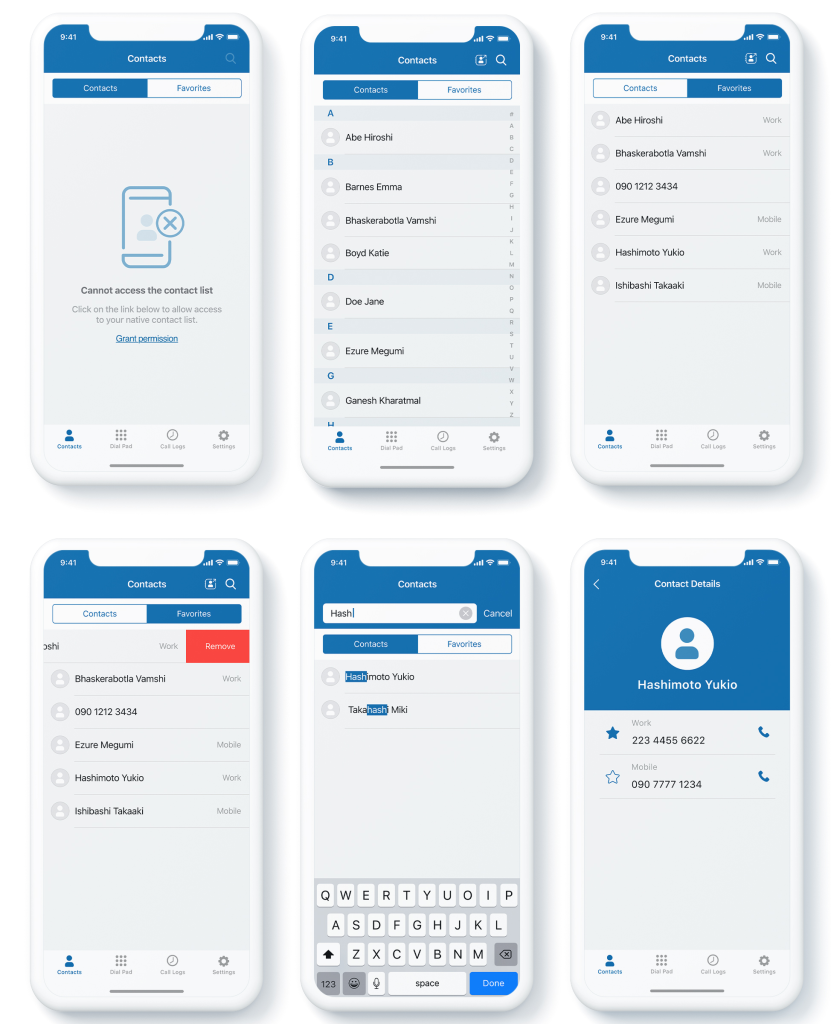
Contacts Screen
Below is the design we have created for contacts flow. Here, we are display contact without permission, contacts, favorites, removing contacts, search contact, and contact details.
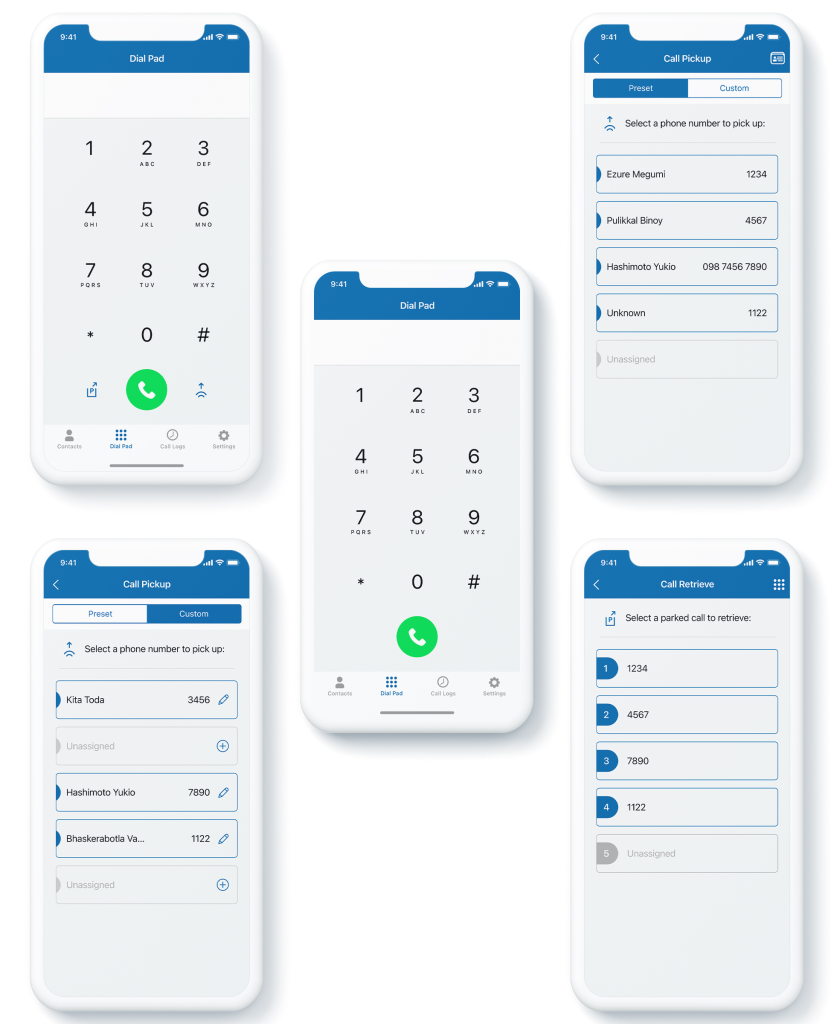
Dailpad Screen
These are the designs for the dial pad. Here in this, we are showing a dial pad for Office worker mode and remote worker mode. A few screens are specific to office worker mode, such as call pick-up, call park, and call retrieve.
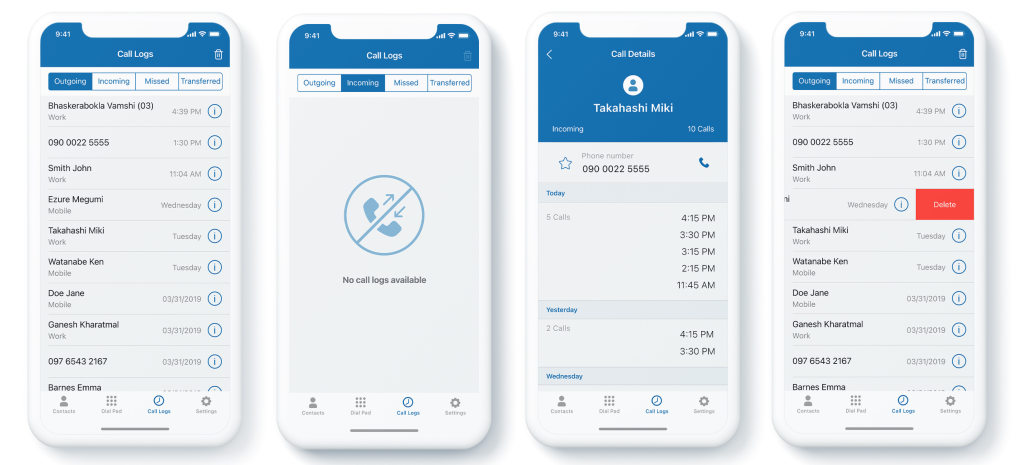
Call History Screen
Here in this screen, to solve the user problem of sorting the calls, we have included the tabs view where the user can view calls as per outgoing, incoming, missed and transferred calls. Also, by selecting particular contact, the user can see a detailed call history with the person, including the number of calls. Users can mark the number as favorite. Also, to clear a particular history user can slide the contact towards the left to remove it from call history.
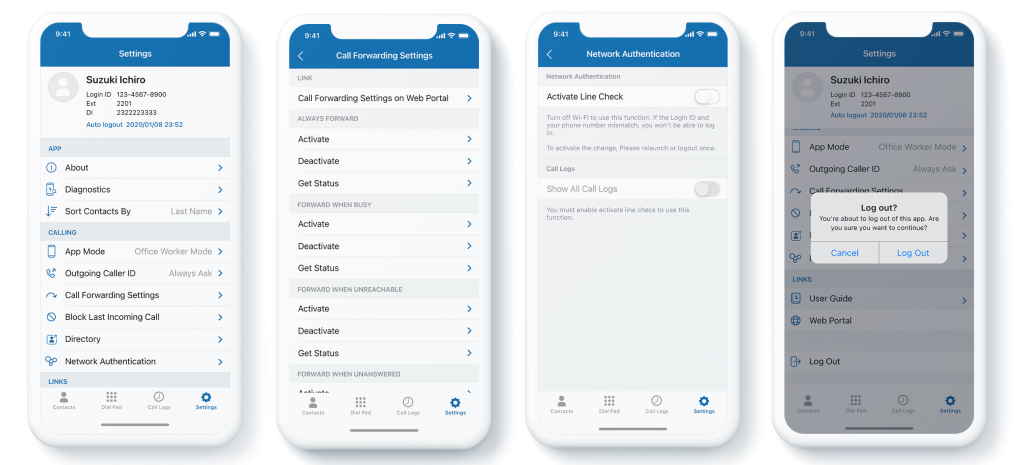
App Setting Screens
The setting screen is the central part of this design as it has a lot of functions and settings options to be taken care of on-screen. I have included significant screens like the Setting page, Call forwarding screen, Network authentication, and Logout.
Active Call and Call Transfer Screen
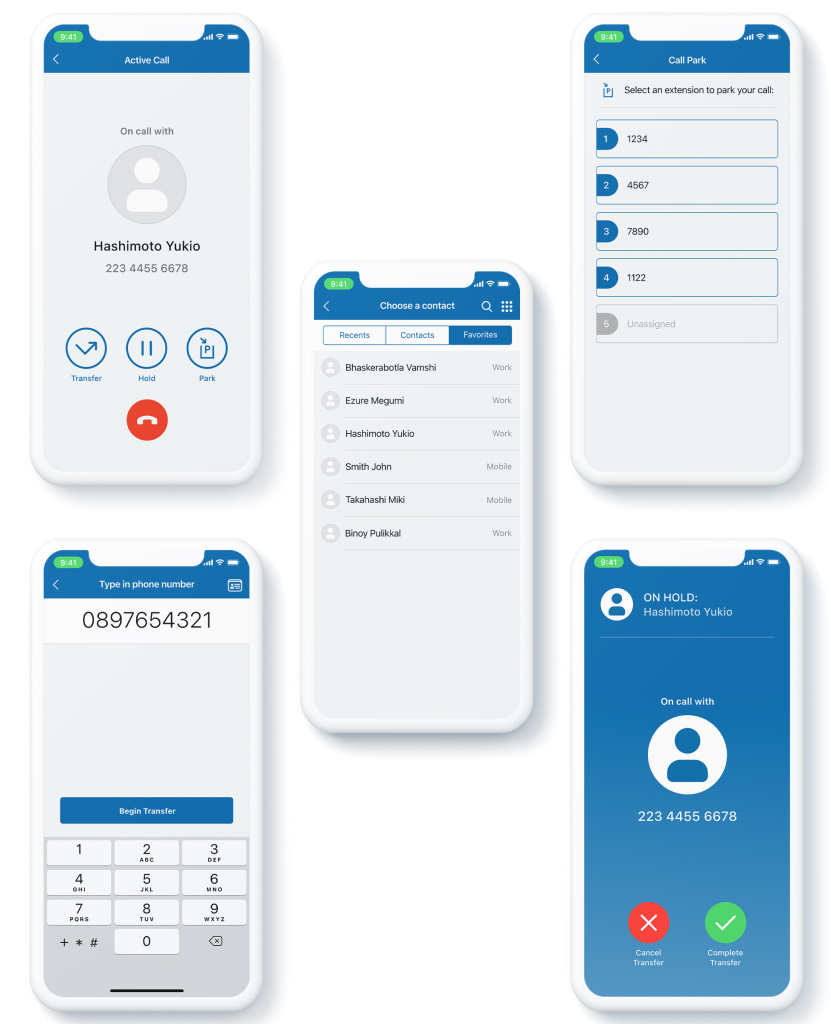
In the below design, I have included some of the significant steps in the active call screen, such as Active call, Call Park screen, Transferring a call to contact or favorite, Transferring a call to a number, and transferring a call screen.
Widget Screen
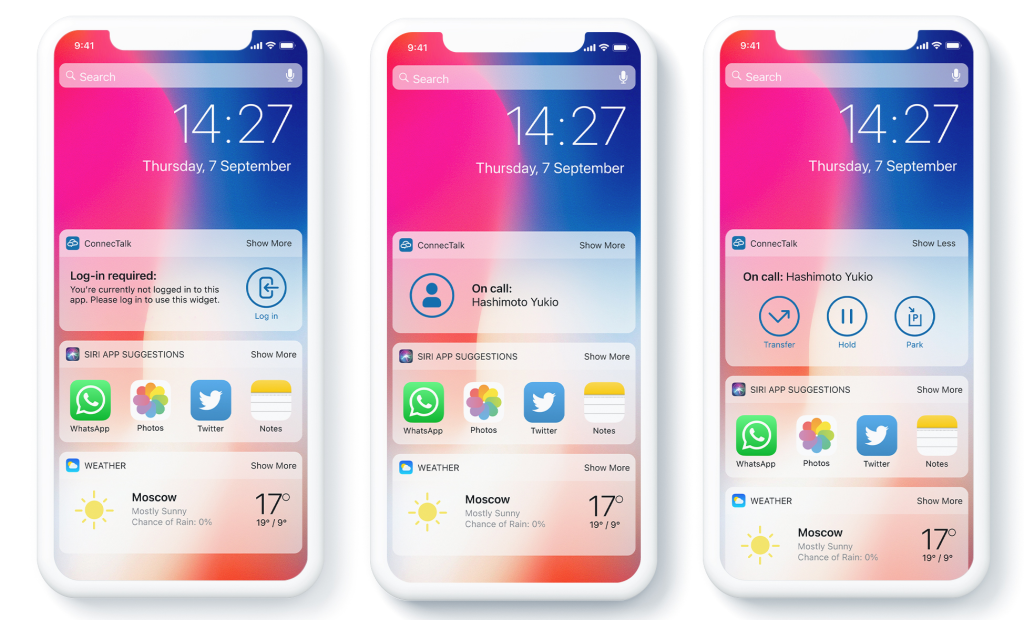
Here is the design for Widget. In this design, I have included three states of Widget. The first one shows the Widget when the app is logged out, the second one shows the Widget with the active call, and the third is the comprehensive view for the active call widget.
What the App Can Do
Designed around the needs of our two personas, the application empowers users to stay in control of their communication whether in the office or on the move. Users can easily place calls on hold, transfer them to colleagues, or forward them when unavailable.
In addition, the app allows users to:
- Quickly access and manage contacts
- Review the recent call history with clear logs
- Use a simple dial pad for direct calls
- Handle advanced actions like call park and call pickup
- Get support through built-in logs
- Manage app settings and preferences with ease
- Apply a custom prefix when needed
How We Measured Impact
Success for JMC Connect Talk was defined by:
- Reduced missed calls: Significant drop in the number of unattended business calls.
- User adoption: High adoption and positive feedback from employees using the solution.
- Business impact: Improved client satisfaction scores, faster decision-making, and measurable reduction in delays due to missed communications.
- Scalability & reliability: Ability to handle thousands of users across different geographies with consistent uptime.
- Regulatory compliance: Ensuring all communications met telecom and data protection regulations without disruption.
Key Challenges
The team divided the project into five phases due to its vast scope and tackled several key challenges during the design process.
- Bilingual Design: The app needed to support both English and Japanese. While designing in English was straightforward, Japanese presented challenges its characters are more complex, denser, and take up more space. Ensured consistency and readability across both languages required extra attention.
- Phased Development: Initially, the plan was to build and release the full app. Later, the client requested a quicker release of a basic version, with remaining features spread across five phases. This required designing a flexible system that could easily accommodate new features and screen updates.
- Evolving UX & UI: With requirements changing in each phase, the UX and UI had to be designed in a way that allowed components to be rearranged and reused. Maintaining consistency while adapting to developing needs was a key challenge.
- Limited Branding: The client provided minimal branding only colors and a logo. Our team had to establish new branding guidelines for the app, creating icons based on iOS and Android standards and defining a fresh, cohesive visual identity.
- Time Constraints: Coordinating across three time zones added pressure. Internal meetings were aligned with US hours, while client discussions took place early in the morning, Japan and India time. Balancing overlapping schedules while meeting tight deadlines was a constant challenge.
What I Learned
This project was a valuable experience for our team, as we successfully transformed a traditional hardware device into a software solution. The primary goal was to solve a critical business problem by replacing the desk phone with a mobile application. Through collaboration, research, and brainstorming, we designed an intuitive and easy-to-use app that allowed users to attend calls remotely whether commuting, traveling, or working away from their desk. This greatly reduced missed calls and ensured timely business communication. We also added network-based authentication, providing secure access for allowed users.
The solution proved especially impactful during the pandemic, when remote communication became essential. It not only helped the client maintain business continuity but also boosted productivity and growth during the lockdown period.
On a personal level, this project became a turning point in my career. I began as an Associate UX Designer in Phase I, but I was in charge of leading the project starting in Phase II. Despite challenges such as time zone differences and designing for both English and Japanese, I successfully managed and delivered four out of five phases. Completing the project with a satisfied client and seeing the app launched in both the Google Play Store and Apple App Store remains one of my proudest professional achievements.